
Card Security Made Easy
The freedom to live life on your terms starts with having control over your cards. With Card Controls, you can do it all, from setting spending limits and curbing impulse purchases to instantly freezing misplaced cards. Get more out of life when you safely manage your finances from one convenient location.
Manage Your WEOKIE Debit Cards Anytime, Anywhere with Card Controls.
Card Controls is seamlessly integrated into your WEOKIE Online and Mobile Banking experience. It allows you to manage your debit cards and alerts conveniently, all from one secure login (your WEOKIE username and password).
Enjoy the convenience of managing your debit cards right within your WEOKIE Online and Mobile Banking platform—there is no need for a separate app! Everything you need is at your fingertips, wherever you are.
Follow our short Getting Started Guide to get started quickly
With Card Controls directly embedded in your banking platform, you can easily:
- Lock/unlock your cards
- Reset your PIN
- Activate your card when it arrives
- Limit transactions by location, merchant, transaction type or dollar amount
- Easily add cards to mobile wallets (Apple Pay® and/or Google Pay™)
- View subscriptions tied to a card and see where cards are stored online
- Stay informed with alerts
- View your spending via easy-to-read graphs
- Get in-depth transaction details
- Report lost or stolen cards
- Quickly identify and report fraudulent transactions
- Set up and manage travel plans
Please note that the Card Controls feature is integrated into WEOKIE's Online Banking and Mobile Banking App (Apple iOS or Google Android). To utilize the Card Controls functionality, you must be a registered user.
Features and Benefits
How do I get started?
Log in to the WEOKIE Mobile Banking App
(1 of 8)
Note: To begin using Card Controls, you must first enroll in WEOKIE’s Online Banking system and/or Mobile Banking App, and then you will have access to all of Card Controls' amazing features.
Register for Online Banking if you are not a current user.
Download WEOKIE's Mobile Banking App Today!

Select Card Controls
(2 of 8)
Mobile Banking: After logging into Mobile Banking, tap the Card Controls button located at the bottom right of your screen or select it from the drop-down menu.
Online Banking: In Online Banking, click on the Card Controls option available in the top banner.
Add a Card
(3 of 8)
If your WEOKIE Debit Card has not been loaded to Card Controls, click “My Cards” and then "Add Cards".
Enter Card Number
(4 of 8)
The app will then ask you to enter your card number to begin and complete the registration process.
Verify Card & Address
(5 of 8)
Enter your address, card security code, and expiration date.
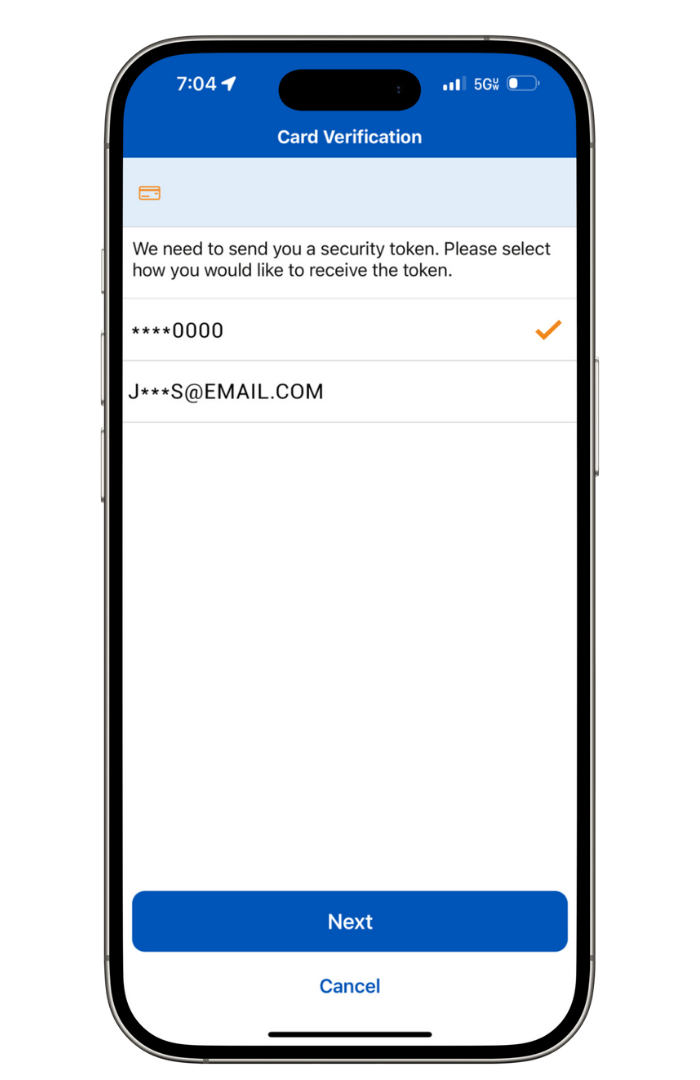
Choose Security Token Delivery
(6 of 8)
We need to send you a security token. Please select how you would like to receive the token (email or text).
Enter Security Token
(7 of 8)
A security token has been sent to your chosen email or phone number. Please enter the code and click 'Continue' to proceed.
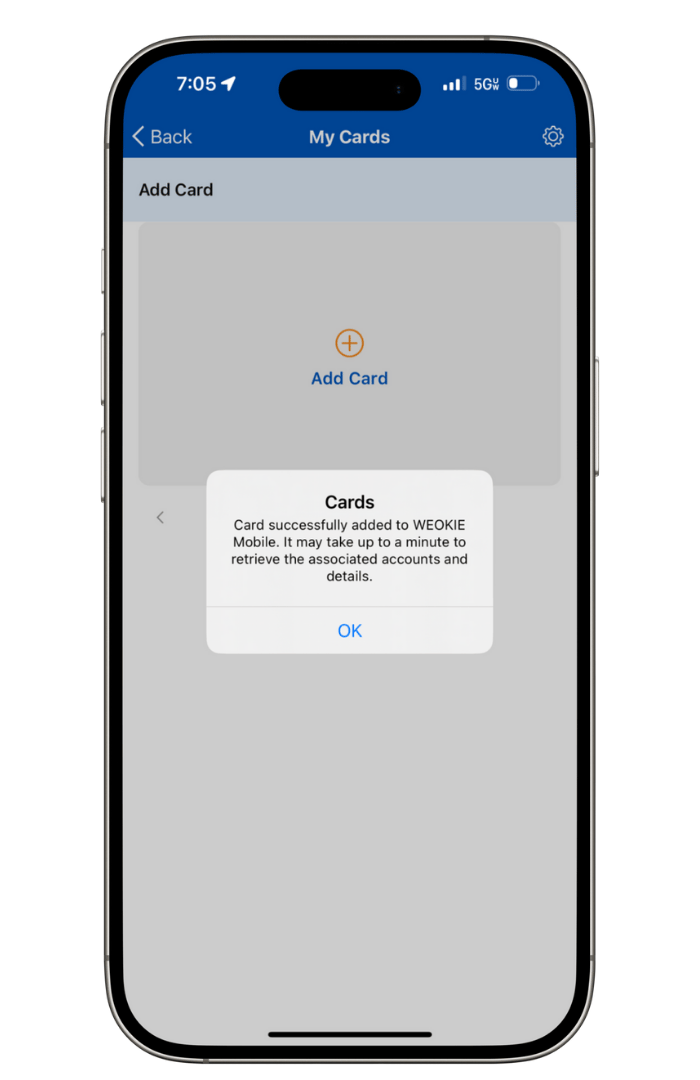
Card Addition Confirmed
(8 of 8)
A notice should pop up saying "Cards have been successfully added. Please allow a moment for us to retrieve the associated accounts and details."
Card Control and Alert Options.
At WEOKIE, we simplify the process of receiving alerts for your debit cards and managing them directly from your smartphone.
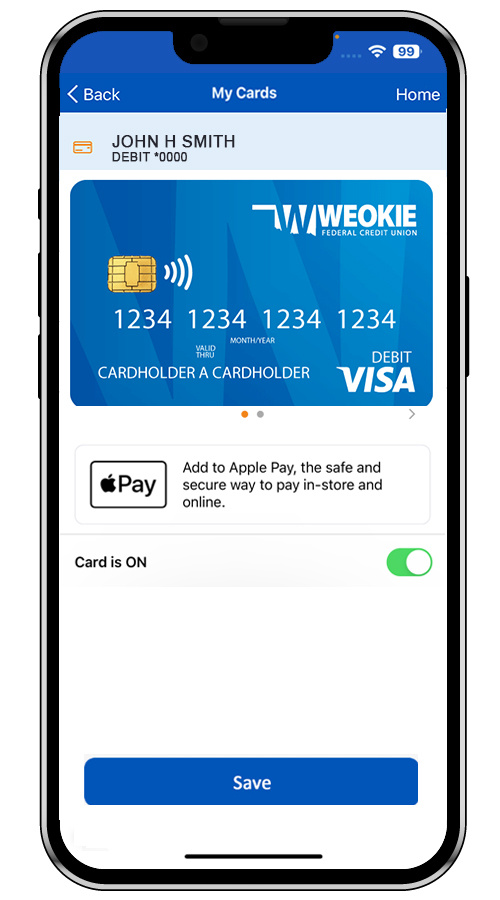
Card Controls Card On/Off Feature
Easily switch your WEOKIE debit cards on and off at any time—ideal for when you're uncertain about the whereabouts of a card. This feature provides you with complete control and reassurance.
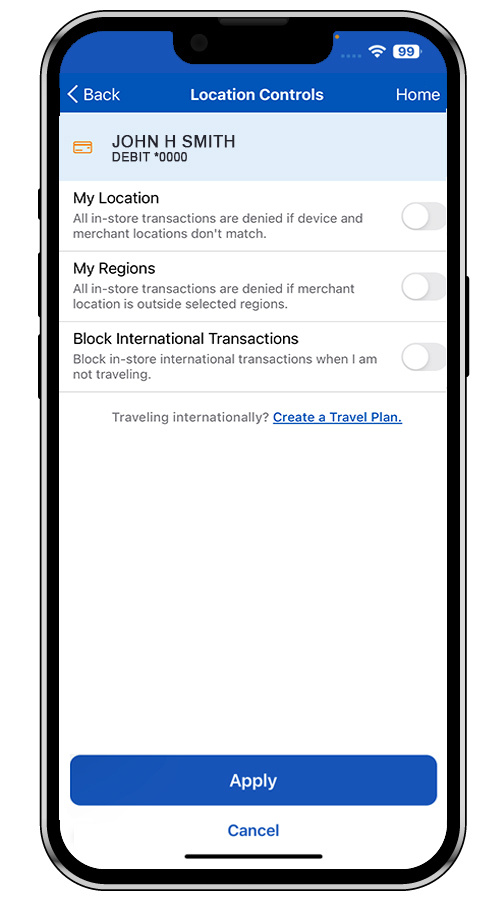
Location Based Control
Utilize location settings to ensure that only you can use your card while it's with you. You can also set up alerts that notify you if a debit card transaction takes place in an unfamiliar location. Take charge of your security against fraud with this feature.
Establish Spending Limits
Employ spending controls to create limits that help you adhere to your budget and save for future needs. Alternatively, set spending alerts to be notified if a transaction exceeds your specified limit or if you surpass your monthly budget. No more concerns about overspending!
Manage Merchant Categories
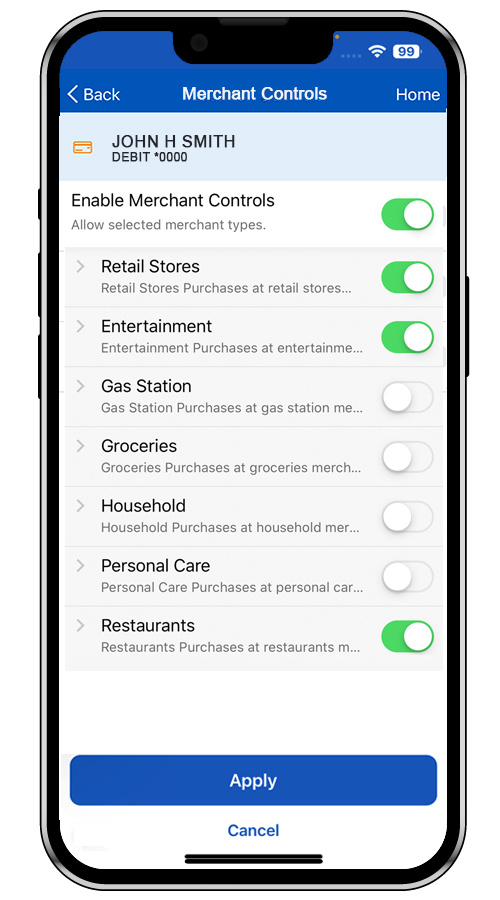
Implementing merchant controls is an excellent way to monitor your expenditures and minimize the risk of fraud. You can activate specific categories whenever necessary and easily deactivate them afterward. Enable merchant alerts to receive notifications when your WEOKIE debit cards are used at designated merchant categories, such as retail shops, gas stations, grocery stores, or restaurants.
Control Transaction Types
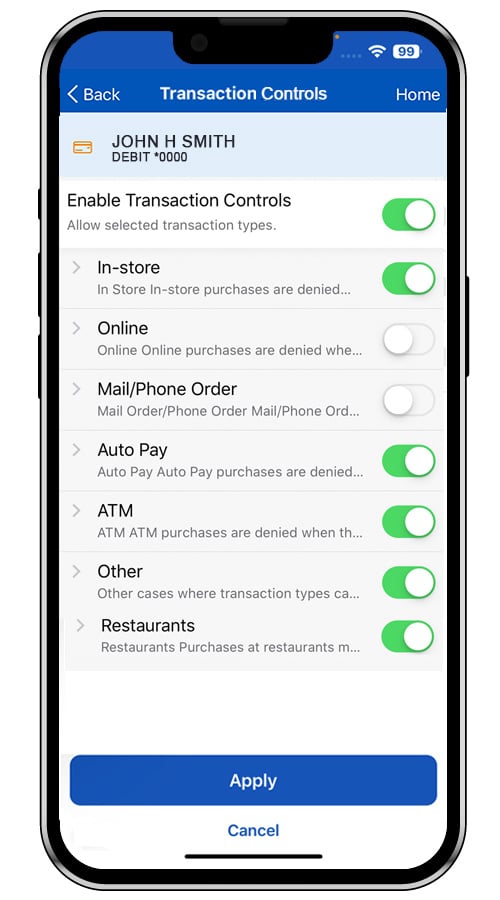
Card Controls allows you to quickly oversee and adjust which types of debit card transactions are permitted. Utilize transaction type settings to approve or block transactions for specific categories, including in-store purchases, online shopping, mail/phone orders, automatic payments, and ATM withdrawals.
Request a Card
Please visit a WEOKIE location or contact us at 405-235-3030 or 1-800-678-5363.
Report Lost and Stolen Cards
Via Phone:
If your card has been lost or stolen, you must contact us right away at 405-235-3030 or 1-800-678-5363.
Reporting a card as lost or stolen is permanent and cannot be undone through the app. For any disputes related to fraud, please contact Member Service at 405-235-3030 or 1-800-678-5363.
If you call after hours, please follow up with us the next business day at 405-235-3030 or 1-800-678-5363 to request a new card be ordered. Also, we monitor any reports of cards being blocked after hours, and you'll be asked if you'd like an instant-issue card at a branch or if you'd prefer to have the card mailed to you. However, we cannot process in-branch requests without knowing your chosen location.
Keep in mind that replacement cards may take 7 to 10 business days to arrive by mail.
Via Card Controls in Online/Mobile Banking:
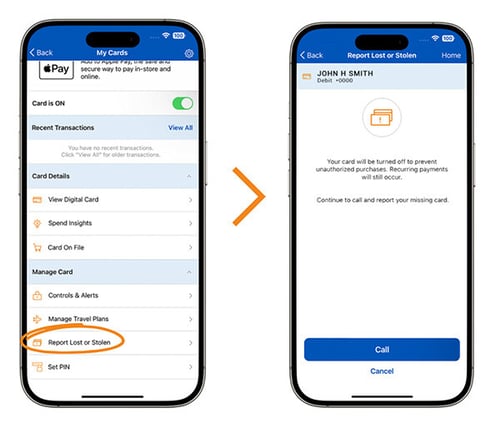
If you believe your card is lost or stolen, you can report it directly from your phone.
Follow these steps to disable the card:
1. Go to the My Cards screen.
2. Select Report Lost or Stolen and follow the prompts.
Reporting a card as lost or stolen is permanent and cannot be undone through the app. For any disputes related to fraud, please contact Member Service at 405-235-3030 or 1-800-678-5363.
If you call after hours, please follow up with us the next business day at 405-235-3030 or 1-800-678-5363 to request a new card be ordered. Also, we monitor any reports of cards being blocked after hours, and you'll be asked if you'd like an instant-issue card at a branch or if you'd prefer to have the card mailed to you. However, we cannot process in-branch requests without knowing your chosen location. Keep in mind that replacement cards may take 7 to 10 business days to arrive by mail.
Card Control Steps:
PIN Change
Via Phone:
To reset a PIN, please call 1-800-992-3808.
Via Card Controls in Online/Mobile Banking:
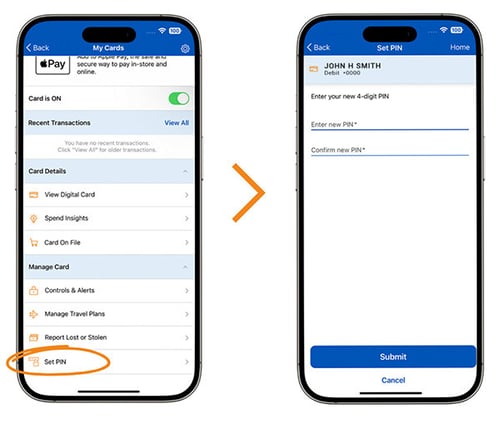
You can conveniently change your PIN through Card Controls via Online and/or Mobile Banking by simply selecting Set PIN, ensuring your account remains safe and secure. From the My Cards Screen, simply choose Set PIN and follow the prompts.
Card Control Steps:
Traveling
Via Phone:
Let us know where you are going and when you will be traveling to make sure you can access your WEOKIE accounts with no problems.
- Call us at 405-235-3030 or 1-800-678-5363 to tell us of your plans – preferably at least one week before your trip.
- Please note that we will need notice of all countries you will be visiting, as well as any countries where you may have a layover and might be making a purchase or accessing cash from your account.
- Even if you're traveling within the U.S., please contact WEOKIE with the dates and cities, and states you will be traveling to.
Via Card Controls in Online/Mobile Banking:
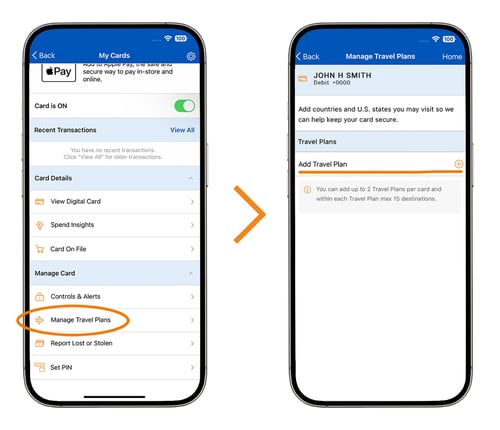
You can conveniently create domestic and international travel notices through Card Controls via Online and/or Mobile Banking by selecting Manage Travel Plans and following the prompts. Additionally, setting up travel plans within the app helps ensure your card functions smoothly while you’re away. This feature automatically establishes exemptions for your transactions, minimizing the chances of your card being flagged for unusual activity. You can specify the locations where your card will be used and limit transactions to merchants within a designated range using your device's GPS.
Please note that the maximum time allowed for a travel notice is 15 calendar days. If a longer travel notification is needed, please contact us at 405-235-3030 or 1-800-678-5363.
Card Control Steps: